Many SEOs struggle with content duplication issues as they scale their clients’ sites.
The sites get bigger, and with that come issues where pages compete and clash.
URL canonicalization is often the easiest way to solve this.
It’s the process of deciding which version of a page is definitive and using canonical tags to tell search engines which URL you want indexed.
Canonicalization in SEO can offer great benefits, but it can also cause significant problems if used incorrectly.
This isn’t something you want to mess up.
Luckily, this guide is on hand to take you through everything you need to know!
We’ll cover:
- What URL canonicalization is
- Why it’s important
- How to do it
What Is URL Canonicalization?
URL canonicalization is the process of establishing the preferred URL when there are multiple pages with the same or very similar content.
Search engines can get confused over which page to rank if you have identical (or near-identical) content on multiple pages.
Setting a canonical URL helps search engines determine the preferred version.

What Are Canonical Tags?
Canonical tags are HTML elements that tell search engines about the preferred version of a webpage. Google introduced the tags back in 2009 as a way for website owners to address issues with duplicate pages.
They are small pieces of code placed in the <head> section of the HTML, and they look like this:
html
<link rel=”canonical” href=”https://example.com/your-preferred-page/” />
This tag tells search engines: “This is the page I want you to focus on. Treat this as the original.”
A quick note on JavaScript: In December 2025, Google updated its JavaScript SEO documentation to clarify how canonical URLs should be handled on JS-rendered pages. The guidance is clear: always set the canonical URL in the original HTML rather than injecting it via JavaScript. If you must use JavaScript, make sure the canonical URL you set matches the one specified in the initial HTML – never use JavaScript to change the canonical to a different URL than the one already declared. If you’re using a modern framework like Next.js, server-side rendering (SSR) is the safest way to ensure canonical tags are embedded in the initial response, avoiding any rendering mismatches.
Why Is URL Canonicalization Needed?
Content and links are the backbone of every successful SEO strategy.
Increasingly content marketing is the backbone of both general marketing and SEO-focused marketing, meaning the number of pages on sites is ballooning.
As websites create more and more content and pages, including different versions of pages for different users, it’s important that search engines don’t mistake these pages for duplicate content and effectively penalise the site (more on this later!).
Why Does Canonicalization Matter?
According to Google Webmaster Trends Analyst Gary Illyes, 60% of the internet is duplicate content – and he said this way back in 2022 before AI came along and did its thing, firehosing the internet with duplicate content!
About 60% of the Internet is duplicate. @methode
#SearchCentralLive pic.twitter.com/jcuu1qrSKQ— Kenichi Suzuki💫鈴木謙一 (@suzukik) November 24, 2022
Now, it’s important to remember just how massive the internet is. This figure is comprised of every website Google encounters which, of course, includes the spammy and low-quality ones that scrape sites.
You shouldn’t, therefore, imagine that 60% of the sites competing with you will be using duplicate material!
It is, however, still eye-opening – and if you think your website has canonicalization or keyword cannibalization issues, you’re not alone.
Most of these issues are due to technical problems. For example, ecommerce sites often experience issues due to URL parameters. If not handled properly, listing many different variations of the same product, or the same product in multiple categories across your site, can cause canonicalization issues if Google doesn’t know which page to prioritise.
Important: Google deprecated its URL Parameters tool in Search Console, which some SEOs used to handle parameter-based duplicates. That option is gone. In 2026, the expectation is that you handle parameter duplicates yourself through a combination of canonical tags, internal linking, and crawl controls.
Similarly, canonicalization issues can also happen with content syndication when it isn’t done properly.
When done properly, like with our service, the content will be republished with rel=canonical tags to let Google know it should credit the original article for the content that has been republished. If it isn’t done properly, the duplicate articles may instead compete with the original – the exact opposite of what you want to achieve!
The result of missing or poorly implemented canonicals is that Google may have trouble indexing your content. It can also dilute your link equity and affect your rankings.
Canonicalization and AI Search in 2026
Here’s something that wasn’t on most SEOs’ radar a few years ago: canonicalization now plays a role well beyond traditional Google search.
Generative engines – think Google’s AI Overviews, ChatGPT, Perplexity, and similar tools – ingest massive volumes of URLs when assembling answers.
Canonical tags help reduce the noise and give these systems a reliable reference point. They tell AI-powered search tools which version of your page to trust, ingest, and surface as an authoritative answer.
In short, a strong canonical strategy is no longer just about managing duplicates in Google’s index. It’s becoming a foundational signal for how your content appears in AI-generated responses too.
Is a canonical tag important for indexing?
I analyzed 4591 urls submitted to https://t.co/6H6hXT0gNK for canonicals, and the impact on indexing.
The data is clear. If you dont have a canonical on your page, it will impact the chance of indexing that page.
Canonical present:… pic.twitter.com/8viUBcQUw7
— Jesper Nissen (@JespernissenSEO) March 16, 2026
How Does It Affect SEO?
URL canonicalization can have a significant impact on your SEO efforts.
Nobody wants to miss out on traffic and sales due to canonicalization issues – and equally, we’d all love to present a win like consultant Ryan Darani once did:
“I once made a business £890k from fixing a canonical tag that was preventing products from being ranked.”
So why is URL canonicalization good for SEO?
Avoid Duplicate Content Penalties
Here’s the thing: it’s very rare for Google to actually issue duplicate content penalties.
Google’s own documentation makes clear that it won’t typically rank your site lower simply because it finds similar pages. But there are still serious SEO issues that URL canonicalization helps you overcome – which is exactly why it matters.
Promote Indexing
URL canonicalization can positively impact the indexing of your web pages.
When search engines encounter multiple URLs with the same content, they struggle to determine the most relevant and authoritative version. This can result in fragmented indexing, or the version of the page you want to rank not appearing in search results at all.
Using URL canonicalization helps Google recognise the preferred version and attribute the correct authority and relevance to it.
Funnel Link Equity
Link equity is the value passed through internal and external links. It’s one of the most important factors in SEO.
When multiple URLs exist for the same content, link equity can get divided among these variations. This weakens the overall impact on search rankings.
Many SEO pros focus on canonical tags purely as a fix for duplicate content – but the link graph is really where they earn their keep. Every duplicated page takes up link equity and dilutes the authority of the pages that actually matter.
Establishing a canonical URL consolidates the link equity from external sources and internal pages, making sure all the link juice flows to the preferred URL. This can result in increased rankings and visibility in search results.
Optimise Crawl Budget
Crawl budget is typically only something that large websites need to worry about. It’s the amount of resources Google uses to crawl your website over a set time. You can learn more about crawl budget and how it works in our expert guide.
You can use canonicalization to optimise your crawl budget. Google crawls the canonical version of a page much more frequently than alternative versions.
You still need noindex tags and robots directives to tell Google which pages not to crawl and index, but canonical tags help you tell Googlebot which pages should always be prioritised.
How To Audit Canonical Tags For SEO
Canonical tags are an important element to consider when auditing a client’s website. Here’s how you can identify issues that may impact search rankings.
Technical SEO Tip: Google only respects canonical tags if they’re in the <head> section of the HTML. Anywhere else in the code, they’ll be ignored:
Google needs to use this rule to ensure that bad actors can’t manipulate your canonical tags. For example, if your site accepts… pic.twitter.com/OAm5Ju8nVa
— Chris Long (@chris_nectiv) August 28, 2024
URL Inspection Tool In Google Search Console
Your go-to tool for auditing canonical tags is the URL Inspection Tool in Google Search Console.
Enter the URL of your preferred canonical page, and you’ll be able to see if it is currently the “User-declared canonical.” You’ll also see if the page is the “Google-selected canonical.”
If another URL is the canonical page, you’ll need to review your canonical tags to indicate to Google which page you want to rank.
This involves checking your pages’ HTML code to identify if canonical tags are present and correctly implemented. You can use browser developer tools to inspect the source code of a page and search for the canonical tag:
html
<link rel=”canonical” href=”https://example.com/your-preferred-page/” />
Make sure that the href attribute points to the correct canonical URL. If there are any missing or incorrect canonical tags, note them down to be fixed.
Screaming Frog SEO Audit
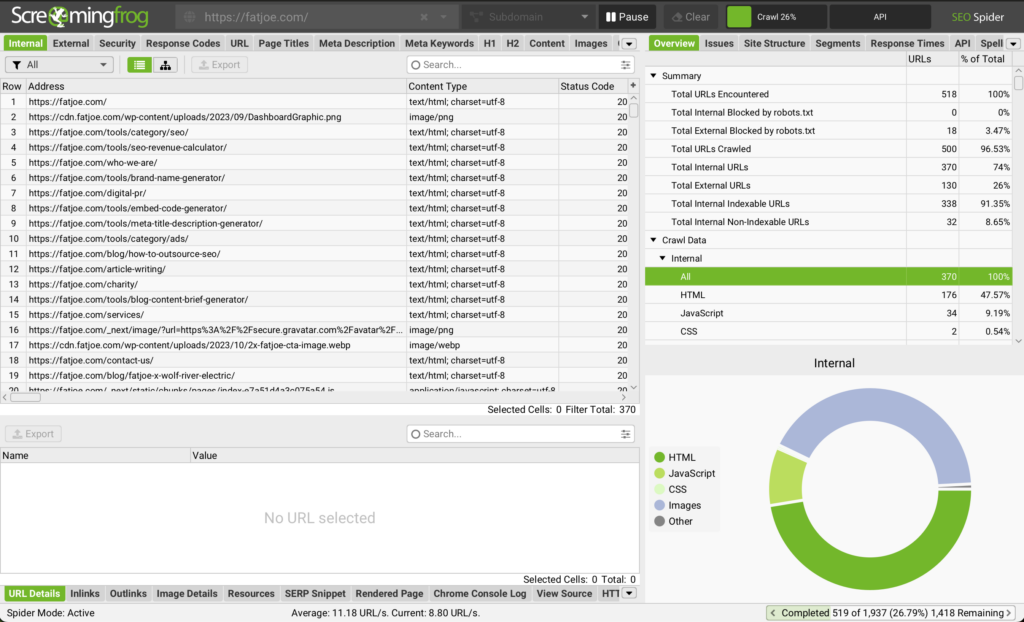
Instead of auditing URLs one at a time, you can use a tool like Screaming Frog to analyse your canonical tags in bulk.
The tool crawls your website and shows which URLs are canonicalised. It also highlights any pages that are missing canonical tags or have multiple conflicting canonicals set.
Watch Out for Signal Conflicts
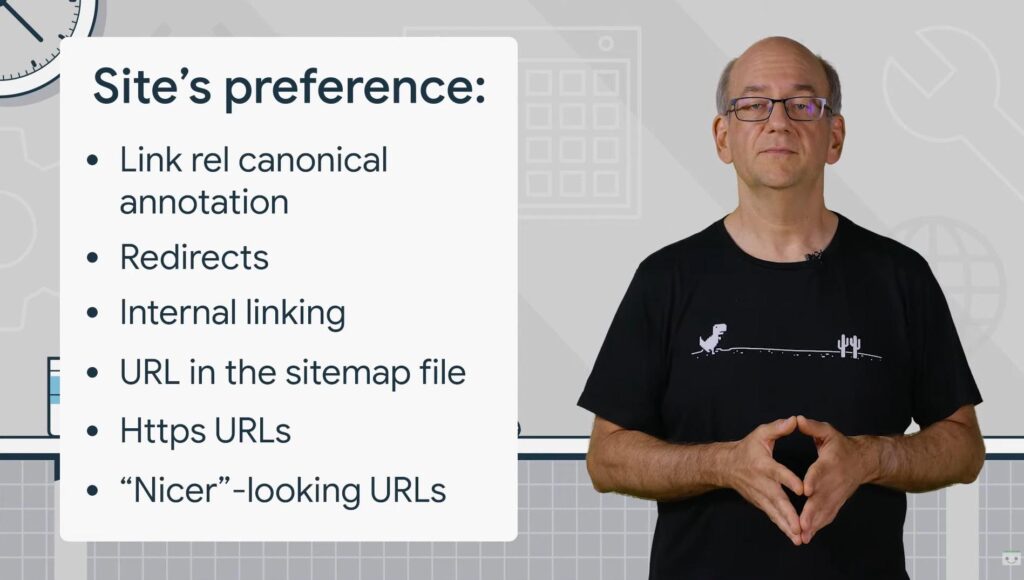
One thing worth stressing in 2026: remember that canonical is a hint, not a directive. If your signals conflict – for example, if your canonical tag points to one URL but your internal links, sitemap, and redirects all point elsewhere – Google can and will ignore your declared canonical and choose a different one.
A robust canonical audit therefore isn’t just about checking the <head> tag. It means making sure your canonicals are consistent with your:
- Internal linking (all links should point to the canonical URL)
- XML sitemap (only include canonical URLs)
- 301 redirects (should align with canonical declarations)
- hreflang tags (for international sites, reference the canonical URL in each)
When all of these signals point in the same direction, you’re giving Google the clearest possible picture of which page matters.
How To Canonicalise URLs
So you’ve identified a duplicate content issue. What’s next?
Implement Canonical Tags
The simplest solution is to add canonical tags pointing to the preferred URL in the <head> section of alternative pages:
html
<link rel=”canonical” href=”https://example.com/preferred-page/” />
There are a bunch of plugins that can help you add canonical tags to a WordPress site.
Yoast SEO and Rank Math are the two most popular options. Both handle canonicalisation automatically by default, but also allow you to override and specify a custom canonical URL via their Advanced settings panels when needed.
It’s also easy to set canonical tags in the advanced settings of Shopify, Squarespace, and most other website builders.
Self-Referencing Canonical Tags
The clue is in the name for this one.
In addition to adding canonical tags to the posts that might be considered duplicates of the “master” page, you can add a self-referencing canonical tag to that master page itself.
This is just another strong indicator to Google that this is the page you want it to index – and they can be added before you create any potentially duplicate pages to head off future issues.
They don’t have to be used, but adding self-referencing canonical tags is a good best-practice habit to get into.
A Note on Pagination
A common mistake is canonicalising all paginated pages back to page 1 of a category or product listing. While this might sound logical, it effectively tells Google that every deeper page is a duplicate and should be ignored. This creates a major discoverability problem – any content or products only accessible through deeper pagination may never be crawled or indexed.
The modern best practice is straightforward: each paginated page should have its own self-referencing canonical and remain indexable. Only canonical a paginated page back to page 1 if it truly contains no unique content or products.
Canonicalisation vs. 301 Redirects
A 301 redirect is a server-level instruction that permanently redirects one URL to another. It tells search engines and users’ browsers that the original URL has been permanently moved to a new location.
Unlike a 301 redirect, a canonical tag is just a hint to search engines to indicate that there is a ‘master’ version of a URL. You’re telling Google which URL you want to index while still keeping the other versions – but it’s not a directive search engines must follow.
As Google’s own documentation puts it, redirects are the stronger signal of the two: they are the preferred option when you truly want to consolidate two URLs for good. Canonical tags are best used when there’s a technical reason to keep multiple versions of a page live while still expressing a preference.
Utilise Internal Linking
Consistent internal linking helps search engines understand the preferred versions of your content.
Make sure all internal links within your website point to the canonical URL. That way, your internal link structure reinforces the authority of your preferred pages rather than working against your canonical signals.
Check out our internal linking guide to learn how to boost your SEO efforts with internal links.
Use HTTPS Over HTTP
Search engines prefer pages that use HTTPS encryption. It’s been used as a Google ranking factor since at least 2014.
For duplicate content issues, it also means that Google is more likely to index and rank the HTTPS version of a page. If you have any remaining HTTP versions of pages, getting those resolved should be at the top of your technical SEO list.
Use Sitemaps
Sitemaps provide search engines with a blueprint of your website’s structure. You can think of your sitemap as a list of all the pages you want indexed – it helps Google crawl your site and find all of your important content.
When you include a URL in your sitemap, you’re indicating to Google that it is the version of the page you want to be indexed. Sitemaps act as a weaker canonicalisation signal on their own, but when combined with canonical tags and consistent internal links, they become a more effective indicator. Consistency across all three is what gives you the clearest possible signal.
Start Improving SEO Performance With Canonical URLs
You’ll always need great content and a strong link building strategy to rank for competitive keywords.
But URL canonicalization is a crucial aspect of technical SEO. It’s how you effectively manage duplicate content issues, consolidate link equity, and – increasingly in 2026 – establish which of your pages AI-powered search engines should trust and surface.
Without canonicalization, you could limit the ranking potential of your clients’ sites and waste effort securing links to non-preferred pages. And in a world where generative search is growing fast, a poorly canonicalised site risks being misrepresented – or missed entirely – in AI-generated answers.
Get your canonicals right and you give every other part of your SEO strategy a much stronger foundation to build on.
Become a Pro at SEO
Join 65,000 others and learn the secrets to SEO success with our weekly blog posts.